PerformanceNavigationTiming
Performance API
Performance API
The PerformanceNavigationTiming interface provides methods and properties to store and retrieve metrics regarding the browser's document navigation events. For example, this interface can be used to determine how much time it takes to load or unload a document.
Only the current document is included in the performance timeline, so there is only one PerformanceNavigationTiming object in the performance timeline. It inherits all of the properties and methods of PerformanceResourceTiming and PerformanceEntry.
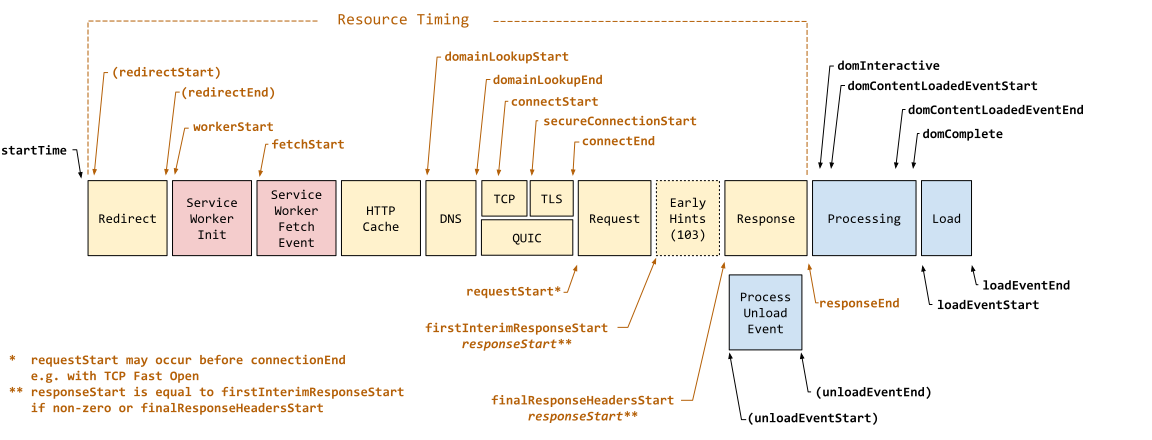
The following diagram shows all of the timestamp properties defined in PerformanceNavigationTiming.
Instance properties
This interface extends the following PerformanceEntry properties by qualifying and constraining them as follows:
- PerformanceEntry.entryType
- : Returns
"navigation". - PerformanceEntry.name
- : Returns the document's URL. Note that text fragments, and any other fragment directives, are stripped from the URL.
- PerformanceEntry.startTime
- : Returns a DOMHighResTimeStamp with a value of
0. - PerformanceEntry.duration
- : Returns a timestamp that is the difference between the PerformanceNavigationTiming.loadEventEnd and PerformanceEntry.startTime properties.
This interface also extends the following PerformanceResourceTiming properties by qualifying and constraining them as follows:
- PerformanceResourceTiming.initiatorType
- : Returns
"navigation".
The interface also supports the following properties:
- PerformanceNavigationTiming.activationStart
- : A DOMHighResTimeStamp representing the time between when a document starts prerendering and when it is activated.
- PerformanceNavigationTiming.confidence
- : A PerformanceTimingConfidence object containing information that indicates whether a performance record reflects typical application performance, or is likely affected by external factors.
- PerformanceNavigationTiming.criticalCHRestart
- : A DOMHighResTimeStamp representing the time at which the connection restart occurred due to Critical-CH HTTP response header mismatch.
- PerformanceNavigationTiming.domComplete
- : A DOMHighResTimeStamp representing the time immediately before the user agent sets the document's
readyStateto"complete". - PerformanceNavigationTiming.domContentLoadedEventEnd
- : A DOMHighResTimeStamp representing the time immediately after the current document's
DOMContentLoadedevent handler completes. - PerformanceNavigationTiming.domContentLoadedEventStart
- : A DOMHighResTimeStamp representing the time immediately before the current document's
DOMContentLoadedevent handler starts. - PerformanceNavigationTiming.domInteractive
- : A DOMHighResTimeStamp representing the time immediately before the user agent sets the document's
readyStateto"interactive". - PerformanceNavigationTiming.loadEventEnd
- : A DOMHighResTimeStamp representing the time immediately after the current document's
loadevent handler completes. - PerformanceNavigationTiming.loadEventStart
- : A DOMHighResTimeStamp representing the time immediately before the current document's
loadevent handler starts. - PerformanceNavigationTiming.notRestoredReasons
- : A NotRestoredReasons object providing report data on reasons why the current document was blocked from using the back/forward cache (bfcache) on navigation.
- PerformanceNavigationTiming.redirectCount
- : A number representing the number of redirects since the last non-redirect navigation in the current browsing context.
- PerformanceNavigationTiming.type
- : A string representing the navigation type. Either
"navigate","reload", or"back_forward". - PerformanceNavigationTiming.unloadEventEnd
- : A DOMHighResTimeStamp representing the time immediately after the current document's
unloadevent handler completes. - PerformanceNavigationTiming.unloadEventStart
- : A DOMHighResTimeStamp representing the time immediately before the current document's
unloadevent handler starts.
Instance methods
- PerformanceNavigationTiming.toJSON()
- : Returns a JSON-serializable plain object representing the
PerformanceNavigationTimingobject. Automatically called by JSON.stringify().
Specifications
Browser compatibility
See also
- Performance.navigation
- PerformanceNavigation